rembg Without Python: Run Background Removal Online (and When to Use the API Instead)
You already know what rembg does. The problem is the install. Here is how to run rembg-style background removal in a browser tab instead, when self-hosting still wins, and why the REST API is the middle path most people miss.

Published on September 15, 2026
If you found this page by searching rembg, you already know what it does: it removes image backgrounds locally, with no upload to anyone’s server. The catch is the setup. rembg is a Python tool — you install it with pip, it pulls down a segmentation model on first run, and you drive it from a terminal, a script, or a container.
That is a reasonable trade for a developer who needs it every day. It is a terrible trade for a designer who needs one cutout before lunch, a marketplace seller with forty product photos, or anyone on a locked-down laptop where pip install is simply not an option.
This guide covers the three realistic ways to get the same result — the online tool, the REST API, and self-hosting — including where rembg genuinely still wins, and what actually drives rembg processing time per image. No single answer is right for everyone, so the comparison is honest about the trade-offs.
Run It Online Instead: The Short Answer
If you just need backgrounds removed, you do not need any of that. RMBG.PRO runs the same job in a browser tab: upload or drag in images, get transparent PNGs back. No Python, no model download, no GPU question. That is the whole point of this page — the tool you know, without the install.
The workflow is deliberately shallow. You open the Remove Background tool, drop in one image or a batch, and download the result. Background removal costs 1 credit per image, and a new account starts with 10 free credits, so you can evaluate the output quality on your own images before committing to anything.
The rest of this article covers the trade-offs honestly, because for some jobs self-hosting still wins — and for others the API is a better fit than the browser.
What rembg Actually Is (So We’re Comparing the Same Thing)
rembg is an open-source background-removal tool distributed as a Python package. It ships in four shapes, and people often compare them as if they were one thing:
| Shape | What it means for you |
|---|---|
| CLI | rembg i input.jpg output.png — one file at a time, ideal for scripts. |
| Python library | Import it and call it from your own code. |
| HTTP server | Run it as a local service other apps can call. |
| Docker container | The same thing, isolated, for servers and CI. |
It also exposes an alpha-matting option, which refines edges — hair, fur, thin straps — at the cost of extra processing time. If your first attempts gave ragged edges, that flag is usually the fix. It is not a guarantee, but it is the first thing worth trying before you conclude the model is not good enough for your images.
So “rembg” is not really one thing — it is a family of ways to run the same model locally. That matters for the comparison below, because an online tool or an API is not replacing a single binary. It is replacing the whole deployment decision: dependencies, model weights, hardware, and the person who has to keep all of it working.
Why People Search for a Way Around the Install
Three recurring reasons come up again and again, and all three are fair:
Setup cost
Python version conflicts, virtual environments, and a first run that has to download model weights before it can process anything. None of that is hard for a developer, and all of it is friction for everyone else.
Hardware uncertainty
Background removal is inference work. On a laptop CPU it is usable but not instant. The gains from a GPU are real but depend heavily on the setup, and reports from users are mixed about how much faster CUDA actually ends up being in practice.
Distribution
If the person who needs the cutout is a designer, a marketplace seller, or a client, “install Python first” is where the workflow dies.
That last one is the real driver. Most people who search for an online alternative are not developers — they are people handed a job that a developer would solve with rembg. The work is identical; the difference is who owns the machine, and whether they have any appetite for maintaining a Python environment just to produce a PNG.
When “Online” Is the Better Call
The browser stops being a compromise in a handful of very common situations:
- You process a handful to a few hundred images, occasionally. Setup amortises badly at this volume. If you need cutouts twice a month, an install that takes an afternoon to get right never pays for itself.
- You do not control the machine. Locked-down corporate laptops rarely allow pip installs, and plenty of them block them outright.
- You need it on mobile or a Chromebook. There is no realistic local install path on either.
- You want bulk processing without writing a loop. Batch upload, one download at the end.
- You need consistent output on someone else’s machine. A browser tab behaves the same everywhere. A Python environment does not.

RMBG.PRO covers these directly: drag-and-drop batch upload, transparent PNG output, an optional solid-colour or custom background if you need something other than transparency, and a logo overlay with position and size control. There is also a separate car-plate masking tool for privacy work, which is a different job from product cutouts but comes up in the same workflows.
Accounts start with 10 free credits, and background removal costs 1 credit per image — see pricing for the current credit packs. That model is easy to sanity-check against your own volume before you commit to anything.
When Self-Hosting rembg Still Wins
Be sceptical of any comparison that says the cloud always wins. Self-hosting is the right answer when:
- Privacy is absolute. Nothing leaves your machine. For medical, legal, or pre-release product imagery, that can be non-negotiable.
- You are processing at real scale. Tens of thousands of images a month, on hardware you already pay for, can beat per-image pricing.
- You need offline operation. Air-gapped environments, field work, or unreliable connectivity.
- You want to fine-tune. You can swap models and post-process the alpha channel however you like.
If any of those describe you, install rembg. It is a good tool and it is free, and no web service removes the fact that you would be uploading images you would rather not upload.
The Third Option Most People Miss: The API
There is a middle path between “install a Python tool” and “click around in a browser”: call a REST endpoint from your own code, and let someone else run the inference.
RMBG.PRO’s background-removal endpoint is a single POST:
POST https://api.rmbg.pro/v1.0.1/remove_background
Header: X-API-KEY: <your key>
Body:   image (file or URL) + the same options as the web UI
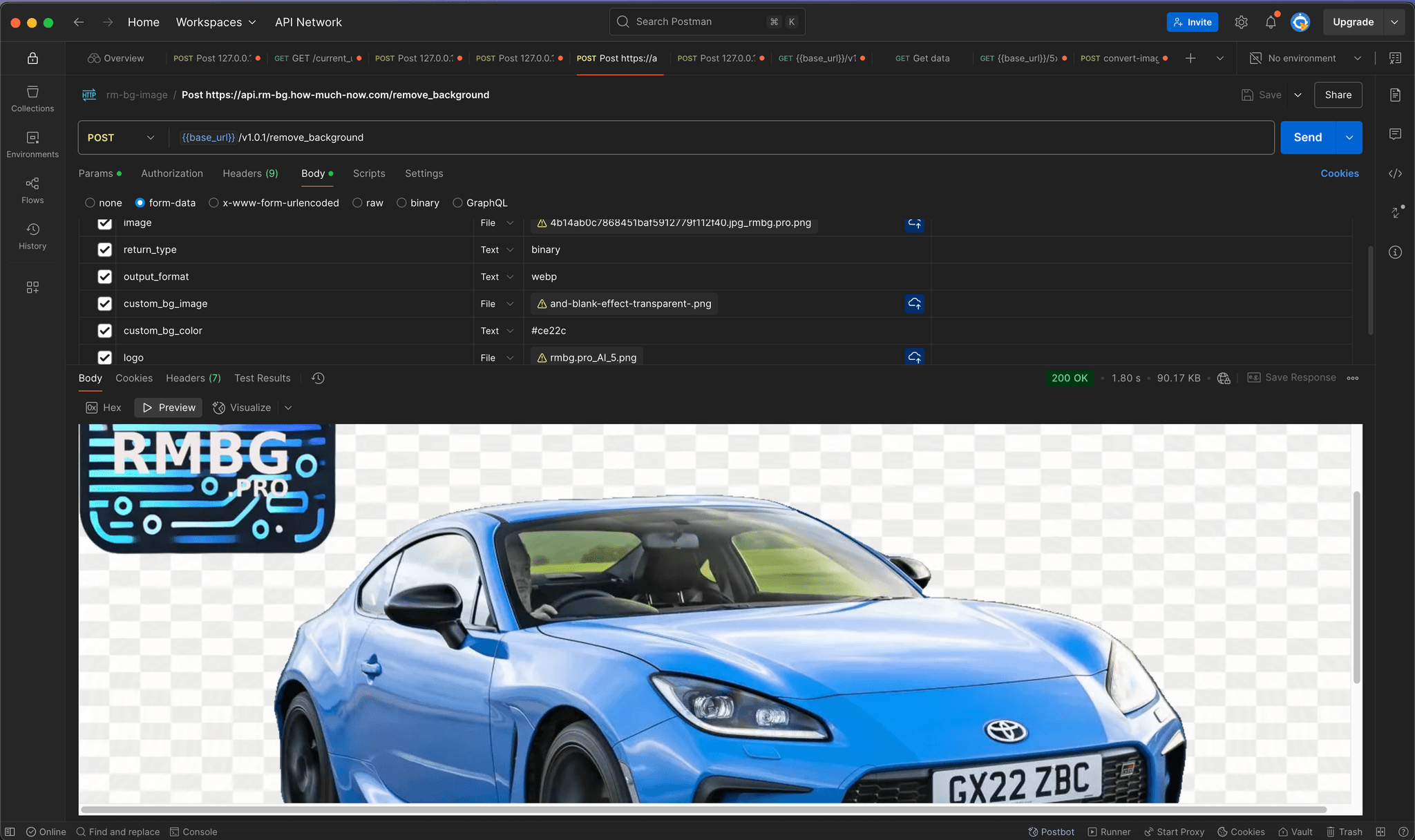
Your key lives in your account profile. There is no SDK to install and no model to download — the request is a few lines in Node, Python, or PHP, and the same parameters control background colour, output format, and logo overlay that the web tool uses. The endpoint reference and code samples cover the full parameter list, and the full API integration guide walks through wiring it into an application.
This is usually the right answer when you have a catalogue or pipeline: an upload flow that needs a cutout before the product goes live, a CMS that should clean images on save, or a marketplace import job. You get the automation of rembg without owning the infrastructure, and you get it without a model that has to warm up before the first request.
Choosing between the available services is its own decision — our comparison of the top-rated background removal APIs covers how they differ in output options, pricing shape, and integration effort.
Ready-made integrations exist for the same reason. The WordPress plugin removes backgrounds inside the media library, so the asset never leaves the editor. Shopify and PrestaShop modules cover their product flows. And if you are working with modern web formats, there is a dedicated WebP background removal path. For a broader walkthrough of the browser workflow itself, see our rm background guide.
rembg Processing Time per Image — What Actually Drives It
This is one of the queries people reach this topic with, so here is the honest answer: there is no single number.
Published figures vary enormously. Some users report roughly ten seconds per image on CPU; others report far longer. Both can be true, because nearly all of that spread comes from four factors:
| Factor | Effect |
|---|---|
| Resolution | Inference cost scales with pixel count. A 4,000 px product shot is a different job from a 600 px avatar. |
| Model choice | Heavier segmentation models give better edges and take longer. |
| Alpha matting | Noticeably slower, noticeably cleaner on hair and fine edges. |
| Hardware | CPU-only is the common baseline. GPU acceleration helps, but real-world reports of the gain are inconsistent — measure on your own hardware before assuming a 10× speed-up. |
Add a first-run penalty on top: the model weights have to arrive before the first image can be processed. That download is the single most common reason people think rembg “hangs” the first time they use it. It is not hanging. It is fetching a model, and the wall-clock time you experience will depend on your connection rather than on your CPU.
Practical takeaway: if you are processing more than a handful of images and latency matters, benchmark rather than guess — and consider an API, where the model is already warm.
Side-by-Side
All three routes remove backgrounds. What differs is who owns the maintenance, and what the workflow looks like once you are past the first image.
| rembg (self-hosted) | RMBG.PRO web tool | RMBG.PRO API | |
|---|---|---|---|
| Install | Python + model download | none | none |
| Images leave your machine | no | yes | yes |
| Bulk processing | yes (script it) | yes (drag and drop) | yes |
| Works from mobile | no | yes | yes |
| Automation | full control | manual | full (REST) |
| Cost model | your hardware + your time | credits (1 per image) | credits, same account |
| Best for | privacy, scale, offline | occasional and bulk manual work | pipelines and catalogues |
“Images leave your machine” is the row worth pausing on. For some teams it decides the question before any of the others matter.
How to Choose in Under a Minute
Pick the browser tool if…
you have images in front of you and need cutouts now. No account setup beyond signing up for credits, no install, no loop to write. Batch upload handles the “forty product photos” case, and background removal costs 1 credit per image.
Pick the API if…
background removal is a step in something repeatable: an upload flow, a CMS save hook, or a marketplace import. One POST to the endpoint with an API key header, and the model is already warm when your request arrives.
Pick self-hosted rembg if…
the images cannot leave your infrastructure, you need offline operation, or you are processing at a volume where per-image pricing stops making sense. Accept the maintenance in exchange.
Remove Backgrounds Without the Install
RMBG.PRO gives you the rembg result in a browser tab: batch upload, transparent PNG output, optional custom background, logo overlay with position and size control, and a car-plate masking tool for privacy work.
- No Python, no virtual environment, no model download.
- 1 credit per image for background removal, with 10 free credits when you sign up.
- Works on locked-down laptops, Chromebooks, and phones.
- A REST endpoint at
POST https://api.rmbg.pro/v1.0.1/remove_backgroundwhen you need it inside a pipeline.
Ready to Skip the Install?
Open the RMBG.PRO background remover, drop in your images, and download transparent PNGs in seconds. No Python required.
Remove Background OnlineFrequently Asked Questions
Is there a rembg online version?▾
Yes. Browser-based options exist precisely because the Python install is the barrier. RMBG.PRO runs the same job in a browser tab — batch upload, transparent PNG output, no Python, no model download and no GPU question.
Do I need Python to remove image backgrounds?▾
No. Python is only required if you want to run the model locally. If you use an online tool or a REST API, the inference runs on someone else’s infrastructure and nothing needs to be installed on your machine.
Can rembg run without a GPU?▾
Yes. rembg runs on CPU. GPU acceleration is optional, and its real-world benefit varies with your setup — benchmark on your own hardware before assuming a large speed-up.
What is the fastest way to remove backgrounds from many images?▾
Batch upload in the browser for occasional jobs, and the REST API when background removal is part of a repeatable pipeline. Both avoid the install entirely, and both avoid the first-run model download.
Does removing a background reduce quality?▾
No. The background is replaced with transparency, so the pixels of the subject are preserved. Output resolution is a separate setting, so check the tool’s limits if you need very large exports.
Similar articles
View all
Détourez vos images dans le navigateur : pas de Python, pas de logiciel à installer. Comparaison entre outil en ligne, API REST et rembg en local.
أزل خلفية صورك من المتصفح مباشرة: بدون Python وبدون تثبيت أي برنامج. مقارنة بين الأداة أونلاين وواجهة API والأداة المحلية rembg.
Recorta el fondo de tus imágenes en el navegador: sin Python, sin programas. Comparativa entre herramienta online, API REST y rembg en local.